Skip to content
TMTechnoMethods

Work / Projects

Real project examples with working interfaces.

These projects show how TechnoMethods turns ideas into practical apps, tools and prototypes: product structure, interface decisions, data modelling and working systems.

Case studies

A practical mix of products, tools and interactive systems.

Each card uses an actual capture from the local project, then explains the product problem, interface shape and delivery thinking behind it.

Strength training app

Setwise

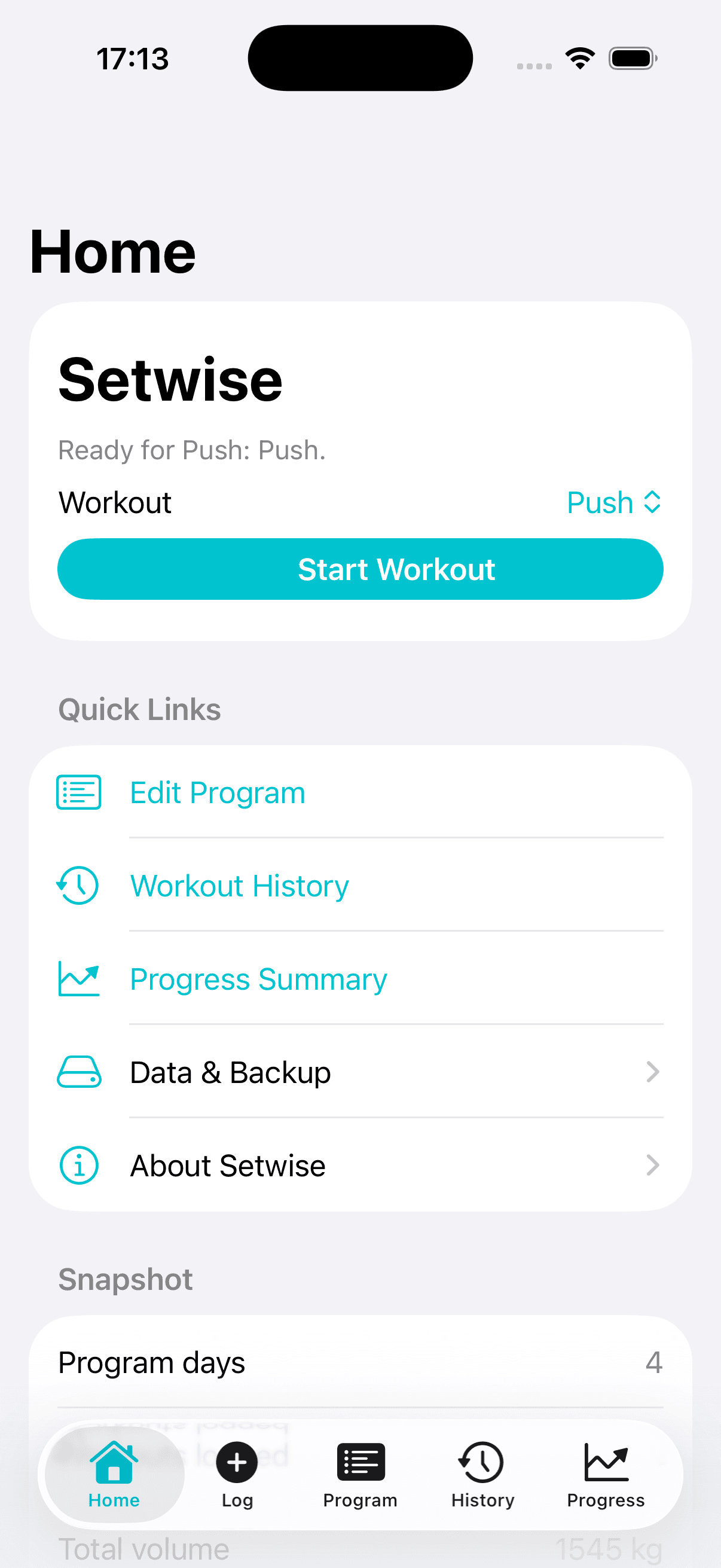
Setwise iPhone app home screen showing workout start controls and quick links

A local-first iPhone strength training log for editable programs, fast set logging, rest timing, workout history, personal bests and progress summaries.
SwiftUI appLocal-firstProgress trackingApp Store product
View project detail

Interaction design learning app

Design Lab

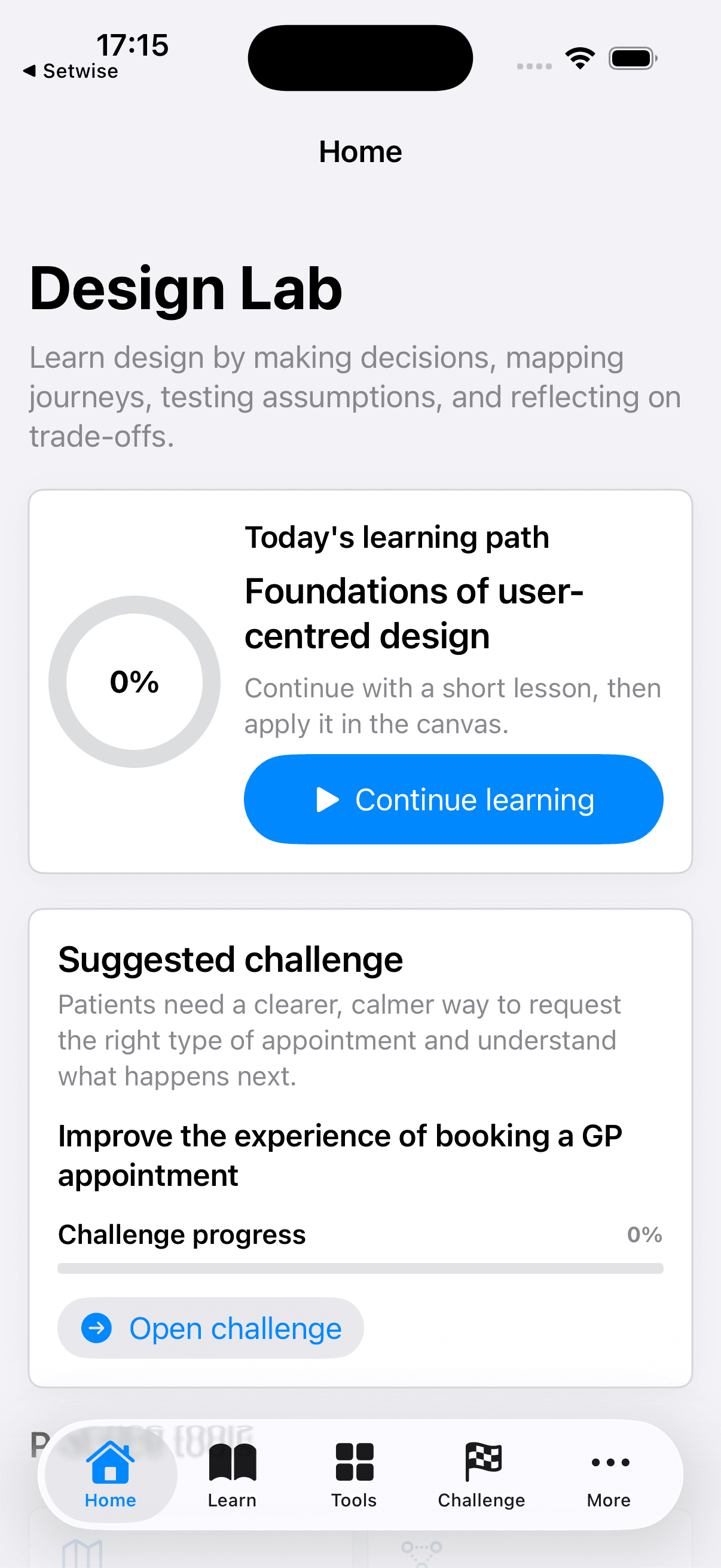
Design Lab iPhone app home screen showing learning path and suggested challenge

An interactive SwiftUI learning product for teaching user-centred design, service design, product thinking and practical design methods.

SwiftUI appLearning productUX educationInteractive tools
View project detail

Strategy simulation game

Kebab Shop Turf Wars

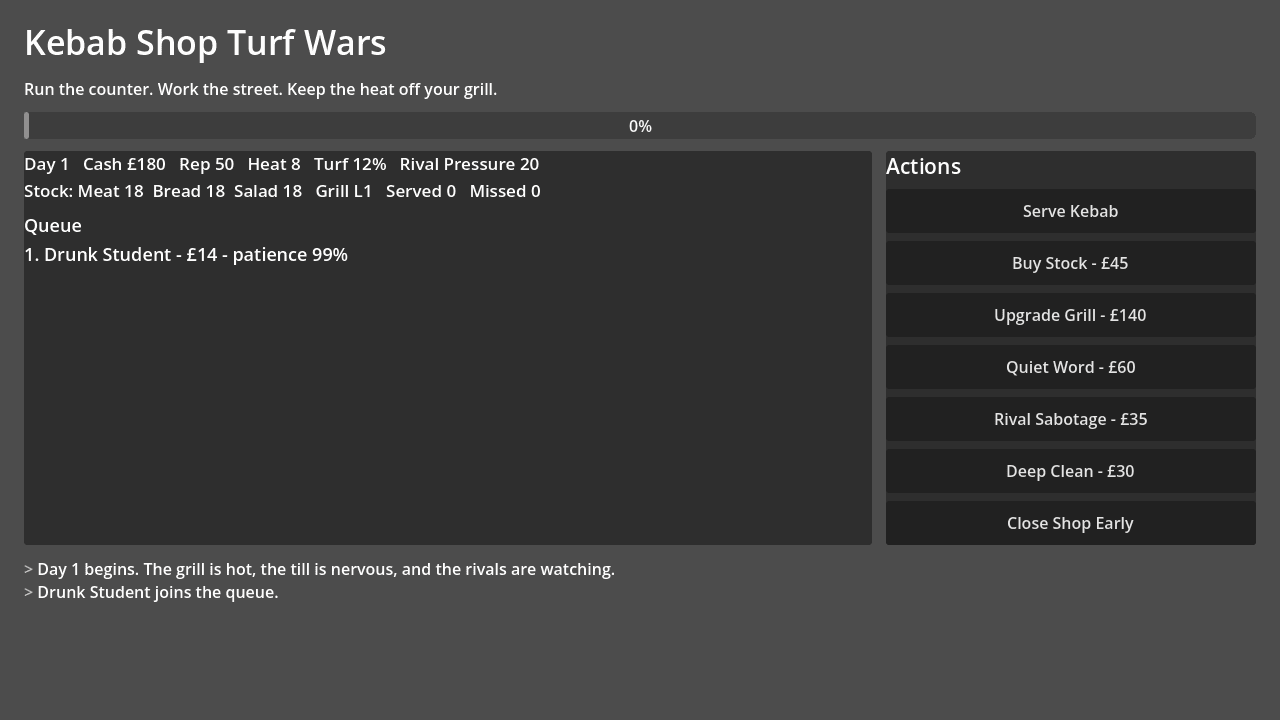
Kebab Shop Turf Wars Godot game screen showing queue, stats, actions and event log

A Godot prototype for a satirical strategy simulation about running a kebab shop while fighting rival takeaways for neighbourhood turf.

Godot prototypeSimulationGame systemsRapid prototyping
View project detail

Wedding planner operations app

WeddingPlannerPro

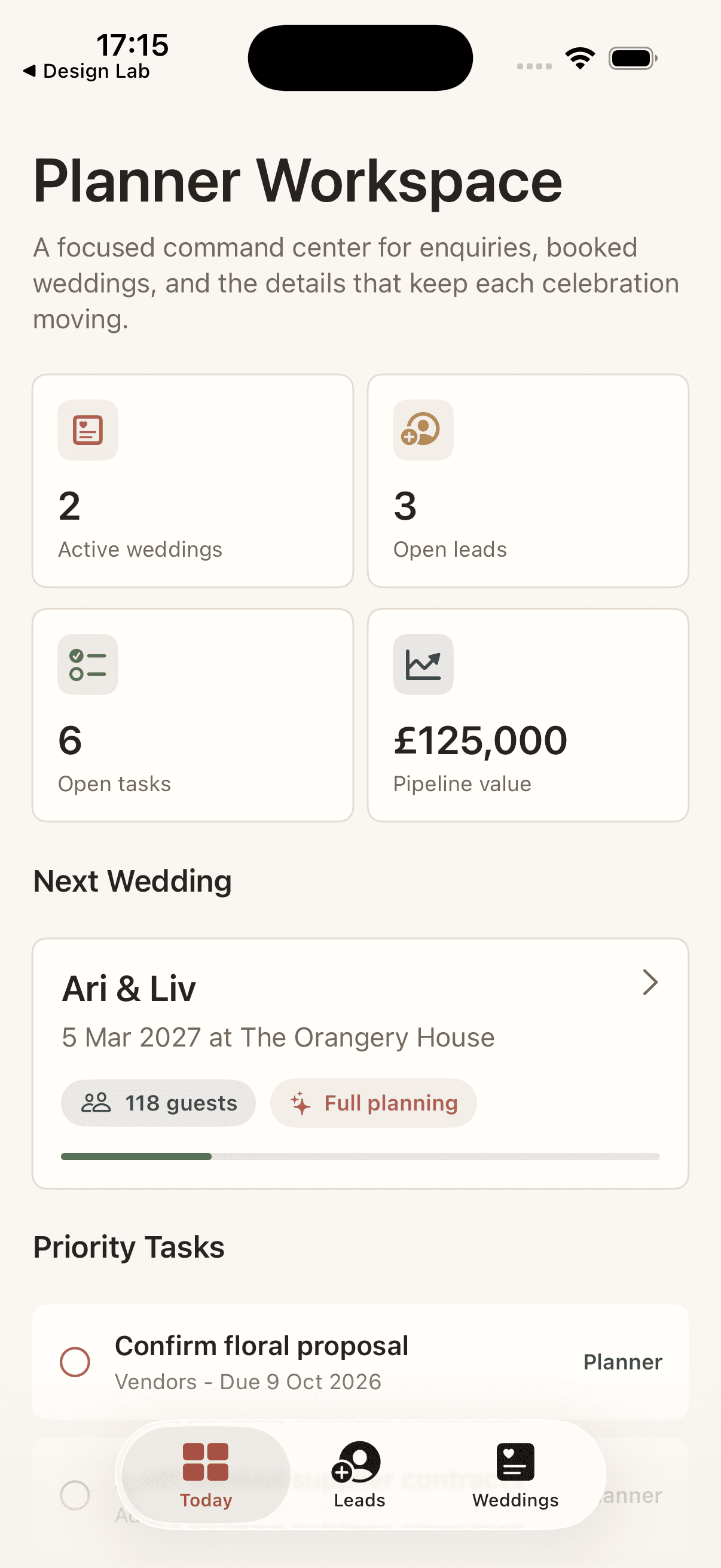
WeddingPlannerPro iPhone app dashboard showing active weddings, leads, tasks and pipeline value

A SwiftUI prototype for managing a wedding planner business, from new enquiries and booked weddings to tasks, vendors, budgets, timelines and planning notes.

SwiftUI prototypeInternal toolPipeline CRMWorkflow dashboard
View project detail

Project 01

Setwise

A local-first iPhone strength training log for editable programs, fast set logging, rest timing, workout history, personal bests and progress summaries.

Setwise iPhone app home screen showing workout start controls and quick links

Problem

Strength logging needs to be fast in the gym, but most products either become too generic to support progression or too heavy to use between sets.

Interface

The interface prioritises a direct workout selector, clear quick links, session recovery and progress access from the home screen.

Outcome

The result is a focused local-first product that can be prepared for a paid App Store release without accounts, ads or cloud complexity.

Build approach

Build a focused SwiftUI app with an editable 4-day program, fast weight and rep capture, previous-set prefill, draft recovery, rest timing, exports and local-only storage.

Product and technical decisions

  • Local JSON storage to keep the first release private and simple
  • Previous-set prefill to reduce logging friction
  • Backup and CSV export before introducing accounts or cloud sync

Features

  • Editable Push, Pull, Legs and Upper + Arms program structure
  • Fast set logging with weight, reps, exercise notes and session notes
  • Previous-set prefill and in-progress workout draft recovery
  • Rest timer with a swipe-controlled Plate Snake mini-game
  • JSON backup, CSV history export and local-only storage
  • Progress summaries with personal bests and estimated one-rep maxes

What this demonstrates

  • SwiftUI product build
  • Strength-training data modelling
  • Fast mobile user flows
  • Progress and personal-best tracking
  • Export and backup workflows
  • App Store launch thinking

Relevant service tags

SwiftUI appLocal-firstProgress trackingApp Store product
Discuss a similar project

Project 02

Design Lab

An interactive SwiftUI learning product for teaching user-centred design, service design, product thinking and practical design methods.

Design Lab iPhone app home screen showing learning path and suggested challenge

Problem

Design learning can become passive when it is mostly theory, slides or disconnected exercises.

Interface

The home experience combines a learning path, challenge prompt, progress indicator and tabbed access to modules, tools and reflection areas.

Outcome

The product turns design methods into an applied practice environment where learners read, decide, map, test and reflect.

Build approach

Build a tabbed learning environment with modules, lessons, quizzes, practical exercises, journey maps, service blueprints, design canvases, challenges, journals and skill progress.

Product and technical decisions

  • Tabbed SwiftUI structure to separate learning, tools and challenges
  • Sample data model for lessons, quizzes, case studies and exercises
  • Practical artefact tools to connect theory with applied product thinking

Features

  • Home dashboard with current learning path and challenge progress
  • Modules with readings, quiz questions, mini case studies and exercises
  • Journey map and service blueprint tools
  • Interactive design canvas with artefact types and design stages
  • Reflection journal and skill progress tracking

What this demonstrates

  • Learning experience design
  • SwiftUI app structure
  • Quizzes and applied exercises
  • Journey mapping and service blueprinting
  • Progress tracking
  • Interactive design tooling

Relevant service tags

SwiftUI appLearning productUX educationInteractive tools
Discuss a similar project

Project 03

Kebab Shop Turf Wars

A Godot prototype for a satirical strategy simulation about running a kebab shop while fighting rival takeaways for neighbourhood turf.

Kebab Shop Turf Wars Godot game screen showing queue, stats, actions and event log

Problem

The idea needed to prove that a comic premise could support an actual strategy loop with risk, resources and readable feedback.

Interface

The screen exposes the whole simulation state: day progress, queue, stock, cash, reputation, heat, turf, rival pressure and available actions.

Outcome

The prototype demonstrates a working loop quickly enough to tune economy, pressure, customer patience and win/loss conditions.

Build approach

Build a Godot 4 GDScript prototype where customers queue over time, serving earns cash and reputation, stock and heat need managing, and rival events escalate each day.

Product and technical decisions

  • Godot Control UI for rapid playable systems work
  • Single-screen state visibility to make the simulation legible
  • Escalating rival events to create pressure across days

Features

  • Customer queue, patience, spend and missed-sale simulation
  • Cash, reputation, police heat, turf, rival pressure and stock state
  • Actions for serving, buying stock, upgrading, bribing, sabotage and cleaning
  • End-of-day rival events and escalating pressure
  • Win/loss conditions for turf, heat, reputation and debt

What this demonstrates

  • Godot and GDScript prototyping
  • Game systems
  • Simulation logic
  • Economy balancing
  • UI overlays
  • State management

Relevant service tags

Godot prototypeSimulationGame systemsRapid prototyping
Discuss a similar project

Project 04

WeddingPlannerPro

A SwiftUI prototype for managing a wedding planner business, from new enquiries and booked weddings to tasks, vendors, budgets, timelines and planning notes.

WeddingPlannerPro iPhone app dashboard showing active weddings, leads, tasks and pipeline value

Problem

Wedding planning work spreads across enquiries, supplier notes, budget tracking, timelines and task lists, which makes priorities hard to see.

Interface

The dashboard surfaces active weddings, open leads, priority tasks, pipeline value and the next booked wedding in one calm workspace.

Outcome

The prototype shows how a service business can turn a scattered process into a focused operational tool with pipeline and delivery visibility.

Build approach

Build a focused planner workspace with dashboard metrics, lead pipeline management, booked wedding records, planning task lists, supplier tracking, budgets, timelines and persistent local data.

Product and technical decisions

  • Lead-to-booked workflow instead of treating enquiries and clients as separate systems
  • Dashboard-first information architecture for daily operational clarity
  • Local sample data to validate business objects before backend work

Features

  • Today dashboard for active weddings, open leads, open tasks and pipeline value
  • Lead pipeline with stages, package interest, enquiry source and next action
  • Lead-to-booked wedding conversion flow
  • Wedding detail workspace with overview, tasks, vendors, budget, timeline and notes
  • Local JSON persistence with sample operating data

What this demonstrates

  • SwiftUI app architecture
  • Operational workflow design
  • Lead and booking pipeline modelling
  • Task, vendor, budget and timeline management
  • Local persistence
  • Service business dashboard thinking

Relevant service tags

SwiftUI prototypeInternal toolPipeline CRMWorkflow dashboard
Discuss a similar project

Product clarity

Turn a rough idea into a buildable workflow and credible product shape.

Interface systems

Design screens, states and interactions that make complex tools easier to use.

Working prototypes

Move quickly from concept to something people can test, critique and improve.

Ready when the idea is

Bring the product, tool or website you keep imagining into working form.

Share what you want to build, where you are stuck, and what success needs to look like.

Start a conversation